Task Templates
Task Templates
A task template is a rule that says "whenever this event happens on a reservation, create this task with this action". The task templates editor is where you, as an operator, define the entire automation surface — what gets sent, when, in what language, to whom.
In this section
- Editor — the V28 task-template editor UI
- Placeholders —
{{guest.name}},{{property.address}}etc. - Actions — what an action can do (
whatsapp.sendTemplate,nuki.generateCode…) - Conditions — auto-resolve conditions (
reservation.nukiAccessCode is_not_null…)
Where it lives
Task templates are managed under Operations → Task Templates (/operations/task-templates).
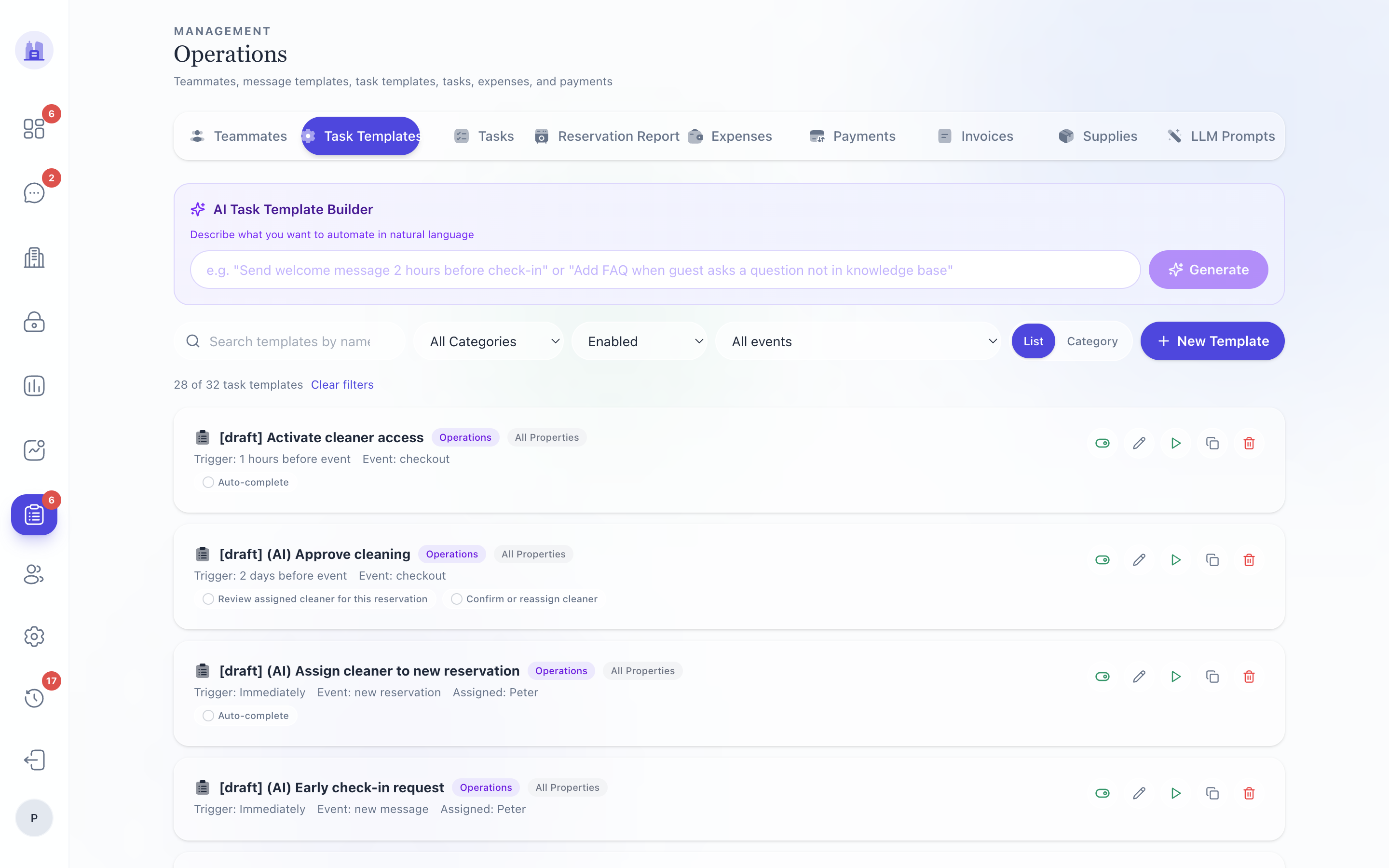
Anatomy of a template
A template has:
- Name (e.g. "Send Check-in instructions")
- Event that triggers it (
reservation.created,reservation.checkin,reservation.checkout,after_checkout, etc.) - Trigger offset (e.g. "24h before checkInTime")
- Assignee role (host / cleaner / admin / specific teammate)
- Action — what runs when the task completes (e.g.
whatsapp.sendTemplate) - Action params — placeholder-resolvable strings (e.g. "Hi {{guest.name}}, your code is {{guest.nukiAccessCode}}")
- Conditions (optional) — auto-resolve preconditions
- Allow dismiss — whether the operator can dismiss without action
Lifecycle
- Define the template in the editor — name, event, action, params.
- Validate — the editor checks placeholder syntax, schema, language coverage.
- Dry-run against a real reservation — see what would happen without firing.
- Save — the template is live; future reservations matching the event will produce tasks.
- Iterate — edit the template; new task fires use the new definition. Existing tasks already created keep their snapshot.
How a template becomes a task
For every reservation, on the configured event:
- The seeder evaluates: should this template fire for this reservation? (Skip if cancelled, skip if already fired and dedup-guarded.)
- If yes, create a task row with snapshot of the template's action + params + conditions.
- Schedule the auto-resolve checklist item if applicable.
- Send the assignee a WhatsApp notification.
See Tasks → Auto-resolve for what happens at fire time.
Related issues
- #185 — Add FAQ entry template fired with "Property not found" error after a schema regression; fixed.
- #153 — V28 editor blocked the save when only
allowDismisswas set with no action; now allowed with appropriate validation. - #254 —
{{guest.email}}/{{guest.name}}were flagged as unrecognised placeholder namespaces by the validator despite being runtime-supported; fixed. - #161 — V28 Reports completeness vs legacy
/metrics. - #149 — tRPC surface audit (operator-meaningful params); affects what shows in the template editor's action picker.
Source: the FlatsBratislava operator manual.