Agent Catalog — what the AI does
The inventory of every autonomous capability in the platform: what it does, what wakes it up, how much rope it has, and where you turn it off.
The four families
| Family | What wakes it | Where you configure it |
|---|---|---|
| Chat specialists | You, typing in the Pulse Copilot | AI Cockpit → Chat Agents |
| Validators | A write or a guest-send, automatically | AI Cockpit → Validators |
| Event agents | A guest message classified as a problem | AI Cockpit → Event Agents |
| Background agents | Reservations, messages, and the clock | Operations → Task Templates (per-rule) |
Family 1 — Chat specialists (the Pulse Copilot)
You type; a router picks exactly one specialist; that specialist answers with its own tools.
Router — picks who answers
- What it does: reads your message and picks one specialist. A fast keyword pass first (bilingual EN/SK); if that is not confident, a small model classifies. A weak pick falls back to General.
- Trigger: every message.
- Autonomy: chooses, never acts.
- Toggle: none — the router is the one part of the Copilot you cannot tune.
Off-domain guard — declines non-work questions
- What it does: refuses questions unrelated to running properties.
- Autonomy: refuses only when highly confident it is off-topic; otherwise it answers normally.
- Toggle: none.
- What it is not: a security control. It filters topics; it does not gate writes, tools, or tenancy.
The specialists
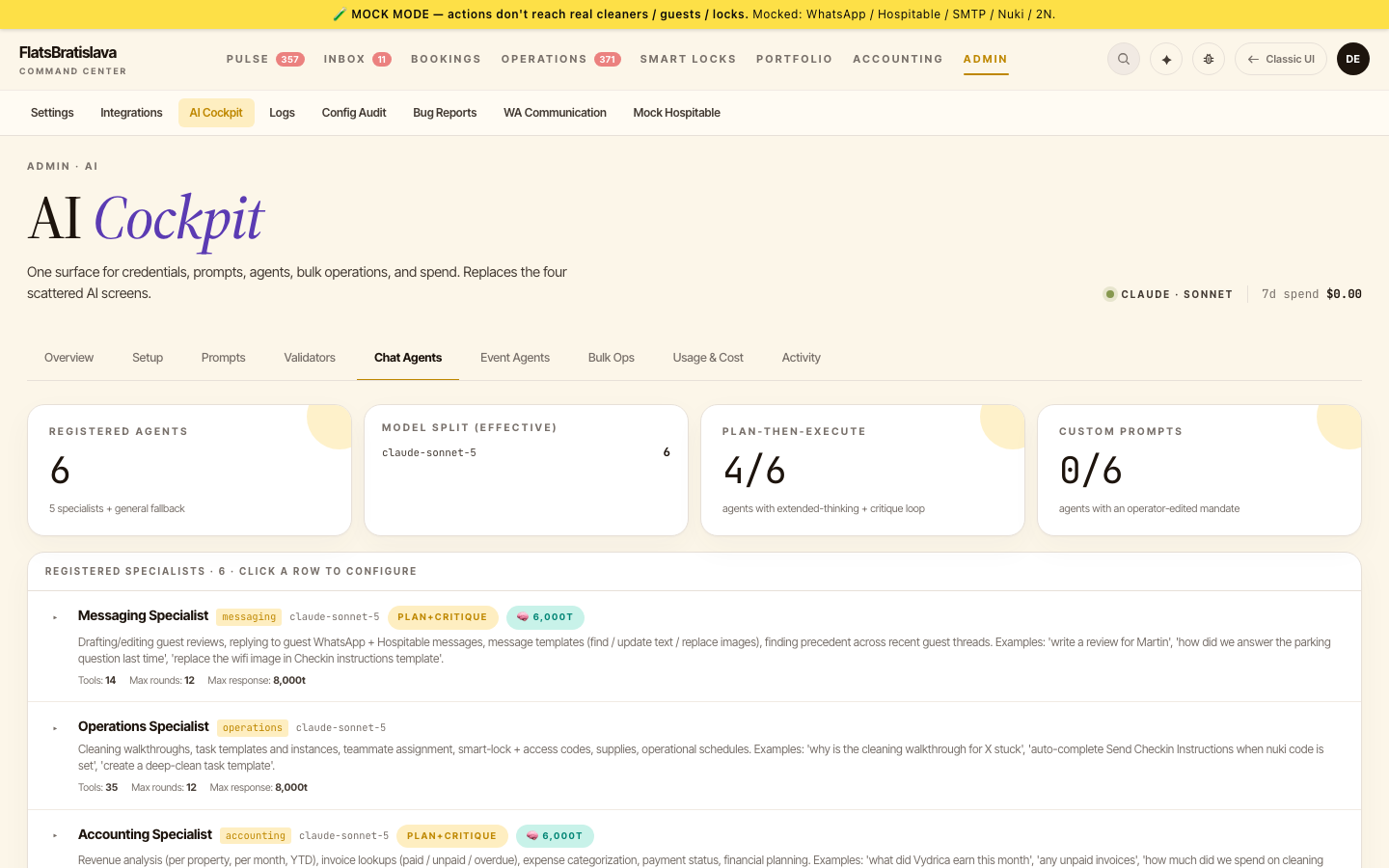
Each is editable at AI Cockpit → Chat Agents — model, thinking budget, tool rounds, response length, plan-then-execute, and the system-prompt mandate. Edits take effect on the next message; no deploy.
| Specialist | What it does | Can it write? |
|---|---|---|
| Messaging | Drafts guest replies + reviews, searches precedent across threads, edits message templates | Yes. Template edits preview first; an approved guest reply sends without a second confirmation |
| Operations | Tasks, task templates, cleaning, supplies | Yes, template edits preview first |
| Accounting | Revenue, invoices, payouts, city tax | Reads; invoice actions preview |
| Knowledge | House manual, FAQs, knowledge corrections | Yes — knowledge corrections apply immediately, no preview |
| Property | The property record — check-in times, guests, locks | Yes, previews first |
| Listing Advisor | Names, titles, listing copy, positioning for Airbnb/Booking | No — read-only by construction. It proposes and stops |
| General | Anything unrouted; the fallback, and the busiest path | Yes |
⚠️ Know which writes skip the preview. Most Copilot changes show a confirm-with-diff step before committing. Three paths do not: knowledge corrections (edits guest-facing content immediately), template image updates, and an approved guest reply (approving IS the confirmation — it sends). AI-composed guest sends are additionally reviewed by the Outgoing Message Check below.
Coordinator — splits a request across specialists
- What it does: decomposes one request into up to 5 sub-tasks, dispatches each to a specialist, then merges the results.
- Trigger: automatic for multi-part requests.
- Toggle: platform-level; not operator-facing.
Family 2 — Validators (the write/send guards)
The validator list is data, not code — per-tenant rows editable at AI Cockpit → Validators. The tab is the source of truth for which validators run on your tenant. The standard pair:
| Validator | Guards |
|---|---|
| Task Template Safety | Task-template create/update |
| Outgoing Message Check | Both guest-send paths |
Each row carries its own confidence threshold and blocking threshold — see Validator thresholds.
The send chokepoint — the thing that actually blocks
A synchronous check sits in front of guest sends; the Outgoing Message Check runs through it. Two deliberate carve-outs worth knowing:
- Access-code carve-out — the guard refuses to block a message carrying a guest's access code. A blocked check-in code is a guest locked out of the building at midnight; that is worse than a bad sentence getting through.
- Access-code delivery guard — after a task is marked done, this backstops the "marked done but the code never actually sent" failure.
Honesty guard (ghost-claim check)
The Copilot checks its own claims: if it says it changed something and no write actually landed, it tells you with a warning banner instead of letting the claim stand. If you ever see that banner, verify the record before assuming the change happened.
Family 3 — Event agents
Maintenance agent
- What it does: a guest message classified as a problem wakes it. It reads context, then either proposes a fix for your approval, or escalates by creating a task for a human.
- Trigger: the
maintenance_neededevent off an inbound guest message. - Autonomy:
operator_in_loop— it proposes; you approve or reject via WhatsApp buttons. It does not act alone. - Toggle: AI Cockpit → Event Agents.
Think of it as AI triage-and-hand-off: an unattended guest complaint becomes either a concrete proposal on your phone or a routed task for a human — never a silent fix behind your back.
Sub-behaviours it can propose: access-code recovery, WiFi-details resend, parking-details resend, smart-lock battery triage.
Family 4 — Background agents (the always-on jobs)
The recurring jobs that run your properties while nobody is typing. Each is a named, single-purpose worker over the same trust-gated machinery:
Stay Planner — plans every reservation's task list
- What it does: watches every reservation and spawns its full task plan from your task templates — generate access code, send check-in, schedule cleaning, request review — each at the right offset for that stay.
- Trigger: reservation created / changed / cancelled events.
- Autonomy: creates and cancels tasks; never sends anything itself.
- Toggle: per-rule, in Operations → Task Templates.
Readiness Checker — verifies the real world before acting
- What it does: at each task's fire time, checks the task's conditions against reality (PIN generated? guest replied? cleaner assigned?). All met → completes the task and runs its action. Not met → marks it blocked and pings you on WhatsApp with the exact failing condition.
- Trigger: each task's scheduled fire time.
- Autonomy: completes or fails tasks; a skipped action is never silently "done".
- Toggle: per-template auto-resolve config (Tasks → Auto-resolve).
Outbound Guard — reviews every guest-bound message
- What it does: the send chokepoint from Family 2, worn as a name: reviews every message headed to a guest, blocks or advises per your thresholds, and refuses to block access codes.
- Trigger: every guest send, from any path (auto-send, Copilot, manual).
- Autonomy: can block; you get Refine / Send Anyway / Dismiss.
- Toggle: AI Cockpit → Validators (the Outgoing Message Check row).
Mood Watch — reads how every guest is doing
- What it does: analyses each inbound guest message for language and mood, updates the reservation, and lets mood-dependent rules react (a thank-you after a happy message; extra care after a frustrated one). Reply drafting picks up the detected language automatically.
- Trigger: every inbound guest message.
- Autonomy: analysis only — it writes the signal, other agents act on it.
- Toggle: none (always-on analysis).
Knowledge Keeper — never makes the same mistake twice
- What it does: when you correct an AI answer, writes the correction into the knowledge base so every future reply — from any specialist — uses the corrected fact.
- Trigger: your correction in the Copilot chat.
- Autonomy: writes the correction immediately (this is one of the no-preview paths flagged above).
- Toggle: the Knowledge specialist in AI Cockpit → Chat Agents.
Price Scout — keeps vacancy prices fresh
- What it does: fetches current channel prices for upcoming vacant nights so Pulse's vacancy card always shows what an empty night would earn.
- Trigger: scheduler.
- Autonomy: read-only — fetches, never changes a price.
- Toggle: none (informational).
Current limits
Honest limits of today's autonomy surface:
- Everything acts with you in the loop. The
autonomouslevel is selectable in the UI, but every agent and validator runsoperator_in_loop— proposals need your approval. - One event agent. The Event Agents family currently ships the maintenance agent; more agent types will appear in the same tab as they ship.
- Background agents are named, not separately toggleable. The Family 4 names describe shipped jobs; their controls live in the surfaces listed per entry (task templates, validator rows), not yet in a dedicated per-agent switchboard.
- Self-promotion is not a thing. Agents do not "learn and promote themselves" to more autonomy — autonomy is a setting only you change.
Related
- AI Cockpit overview · Chat Agents editor · Prompts editor · Cost dashboard
- Pulse Copilot user guide
- Validator thresholds